In the past, collaboration happened in meetings, phone conferences or passing documents back and forth via mail. It is now possible for groups, team members and activists to communicate and exchange information about a project and build a documents, process or create an event.
Look, All I Want To Do Is Shelve Books, Is This Really Important?
Yes it is. I support sniffing book dust but at some point you are going to be asked to participate in a project or presentation. If you haven't taken Library 104 yet this is your pre-warning.
You will find that your team members are time strapped. They have personal and professional obligations in addition to the one they just got roped into. The same as you.
Online collaboration tools make it easy to contribute, edit and present information with a reduction of time lag. The other thing about on-line collaboration is you find out real quick who is the slacker and who delivers what they have promised.
What Is A Wiki?
I'm going to let the good folks at PBWiki help explain this to you.
A wiki is a place where a group of people use software to make it easy to work together on a project. You can upload text, photos, maps or links to places that would support the team's goals. You don't have to be a techie to use a wiki, everything is set up for you to enter your information and put it out to the public or just visible to the folks on your team.
In addition to the ones I mentioned in the Library 101 presentation:
- PBWiki and there is an Academic version of PBWiki for educators, libraries and institutions.
- Backpack It allows you or a team member to organize a project, a work flow or anything else a group of folks want to work on. There are free and paid versions. Check out the video tutorial on the main page.
- GoogleDocs allows you to using an online word processor, spreadsheet and presentation software with other team members. So if there is a class report that has to be completed your team could set up the report and members could add to it any place where there is Internet access and at any time. You just need a Google Account and then sign into Goolgle Docs.
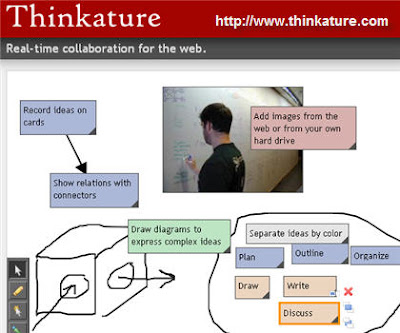
Thinkature - visual collaboration with drawings, outlines and short notes. Remember, not all good ideas arrive via words. Sometimes you have to show in order to tell.
Zoho Notebook - you can add video, photo or text to your Zoho Notebook and keep track of changes made to the project. Zoho has a whole range of free on-line applications such as word processing, wiki, e-mail client, planners and more.
WriteWith is specifically for team documentation. It allows you to set up your team members, the name of the document and the last update. Using WriteWith a team leader can send invitations to team members to review what you have written or edit and include a deadline.
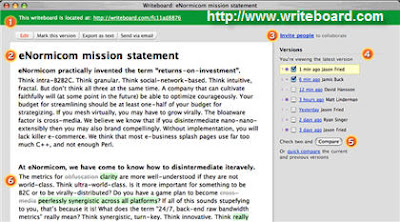 WriteBoard - Place your idea on the write board and have others edit what you have written. You can have a list of team members and you can view comments about the changes in the document.
When you have to get something done with a group of people and there is no time to meet in person then consider using one of these tools to meet and work in cyberspace.
As always, if you have questions please send them in the comments. The comments are moderated so it might take a while to check them out and get back to you.

