Showing posts with label reference. Show all posts

Monday, 9 January 2012

Locating the Law Handbook for Non-Librarians

I love a freebie that comes from good stock. The Southern California Association of Law Libraries has a new edition of the Locating the Laws Handbook. If you are interesting in working in a law library or need to find a law source quickly this might be the publication you have been seeking in the stacks.

5th Edition of Locating the Law, A Handbook for Non-Law Librarians

There is much goodness to be found here. Chapter 3 has a guide to conducting a legal information search and interview techniques. This is a section of the handbook that talks about the legal information interview:

Regardless of how the question is phrased, the user is ultimately asking what law or laws apply to his or her situation. Your first task, as in any reference interview, is to analyze the information provided in order to identify the relevant facts and to weed out the irrelevant. To determine the relevant facts, you will usually need to ask additional questions. At this point, it is appropriate to briefly address concerns about the unauthorized practice of law.

Librarians conducting a reference interview should not be afraid to ask questions of someone seeking legal information. Asking questions in order to make recommendations about appropriate legal resources to consult does not constitute giving legal advice. 

The handbook is a Adobe PDF document. You can view by chapter or you can download the entire handbook and read it on your computer or with you favorite tablet or e-reader.

You definitely want this on your virtual resource shelf.

Tuesday, 11 October 2011

InfoPeople online courses: CORE Reference Fundamentals (An Infopeople Online Learning Course)

NOTE: PCC Library Technology Students are eligible for the 'library' rate.

Date: Mon, 10 Oct 2011 11:55:30 -0700
From: "Gini Ambrosino" <assist@infopeople.org>
Subject: [calix] Infopeople's online course "CORE Reference Fundamentals "

Since some people who may be interested in participating might not receive this notice directly, we would appreciate it if you would print and post or route this announcement to staff and colleagues. Thanks.

For the full list of Infopeople training offerings please see the <http://infopeople.org/training/planned> 2011/2012 Training Program.
Title: CORE Reference Fundamentals (An Infopeople Online Learning Course)
Dates: November 8 - December 19, 2011

to register for this course: Click the link to Online Registration at:
http://infopeople.org/training/core-reference-fundamentals

Fee: $75 for those in the California library community and Infopeople Partners, $150 for all others.

Libraries of all types provide reference services to their users. To provide effective reference requires staff who understand and can apply the underlying values and methods needed to assist users in finding the best possible resources to meet their information needs.

Are you stepping into the role of providing reference assistance for the first time in your library career?

Is it time to brush up on your basic skills because you are returning to work at the reference desk?

Do you want to be able to quickly identify and locate information in all formats?

Whether you have been recently promoted to support reference services, or are returning to reference work some years after you completed your library degree, you'll need a clear understanding of how to determine the real information need behind users' questions and where to look for authoritative answers. This course will acquaint you with why, when, and how to do an effective reference interview, which resources are best suited to which types of reference questions, how to use both print and Web-based resources appropriate to the user's need, and how reference work fits into the mission of your library. You'll learn how the physical layout of your library, and signage and shelving for various collections can impact reference service.
You'll become familiar with alternative methods for delivering reference, such as email, chat and instant messaging, to help your users no matter where they are or when the library is open.

Course Description: This online course will provide you with opportunities to learn and practice an effective reference interview, as well as to explore a wide variety of print and Web-based reference tools. Through individual and group exercises, you will discover ways to assist diverse groups of users, including those with physical disabilities and those with whom you do not share a common language. You will learn to think like an indexer and apply that perspective to answering reference questions. We will spend time examining specialized resources for homework help, government research, and inquiries about images or sounds. The instructor will provide sample policies, templates, tip sheets and a webliography, as well as simple, practical techniques that can be applied immediately.

During the course, you will be doing exercises and taking quizzes. You will also participate in weekly online discussion forums as part of the online learning process.

Preliminary Course Outline: Using your web browser and your Internet connection, you will log in to the Infopeople online learning site and complete the following learning modules:

Week 1: The Reference Interview

o Goals and components of an effective reference interview

o Helping with sensitive questions

o Phrases to incorporate into your reference interview

Week 2: Library Users' Rights to Privacy and Open Access

o First Amendment, Library Bill of Rights, and ALA Code of Ethics

o Working across barriers of physical ability or communication skills

o Responding appropriately to library users of different ages

Week 3: Reference Resources in Your Library

o Building layouts

o Special collections

o Your library's website

o The structure of your library's catalog

Week 4: Construction and Use of Indexes

o Comparing and contrasting print and online indexing

o Databases and ready reference work

Week 5: Evaluating Reference Tools

o Print tools

o Online resources

o Search engines

Week 6: Contemporary Ready Reference Tools and Delivery Methods

o Nontraditional reference sources, like Flickr and YouTube

o Government publications (online and in print)

o Niche inquiries, including homework, sports, and celebrities

o Roving, passive versus active reference services, for profit reference
businesses

Instructor: <http://infopeople.org/francisca_goldsmith> Francisca Goldsmith. Francisca worked most recently for the Halifax Public Libraries (Nova Scotia) and Berkeley Public Library (CA). She has managed branch services for a regional library system, served as the collection management librarian and head of teen services, and provided reference services in both academic and public libraries. Working with school and public library staff, she has provided training to support up-to-date reference assistance and to design local weeding projects. Francisca has taught a wide variety of Infopeople courses and also consults as a Young Adult Library Services Association (YALSA) trainer for staff development institutes.

Time required: To complete this course, you can expect to spend 3 hours per week over 6 weeks, for a total of 18 hours. You can work on each module at your own pace, at any hour of the day or night. However, it is recommended that you complete each week's assignments within that week to stay in sync with other learners.


Who Should Take This Course: Anyone from the library community who provides reference service. This course is appropriate for paraprofessional staff new to reference work or librarians who need updates on contemporary tools and methods that support excellent reference service.

Library Support Staff Certification (LSSC): This course is approved as covering the Reference and Information Services competencies for the LSSC program <http://ala-apa.org/lssc/> .

Online Learning Details and System Requirements may be found at:
http://infopeople.org/learning_details.

After the official end date for the course, the instructor will be available for limited consultation and support for two more weeks, and the course material will stay up for an additional two weeks after that. These extra weeks give those who have fallen behind time to work independently to complete the course.

If you would like to subscribe via RSS and be notified whenever new Infopeople training events are available, you can use these links:
**For new on-ground or online workshops:
http://feeds.feedburner.com/infopeopletraining
**For new podcasts: http://feeds.feedburner.com/InfopeoplePodcasts

Thursday, 28 July 2011

Quick Look At the Helioid Search Engine

I have friends and relations that kinda sorta know how to use Google. They don't know about Bing, Ask.com or the other search engines that are available. Then again, a lot of folks believe that Facebook is a search engine.

I am restricting how many semantic wars I can handle in a day.

You, on the other hand, should know about the diversity of options you have when it comes to web search engines. This is a new one called Helioid.

Helioid Search Engine
The above screen capture is from the Quick Help at the web site. Basically you can type in your search term/keyword and not only do you get a list of viable links you get a side category of topics that are color coded to your search results.

I did a test search using SuDocs (The Superintendent of Documents classification system) These are the topics area that were visible on the left side of the screen:
  • Libraries
  • Department
  • 2011
  • Document Classification
  • Publications
  • Documents SuDocs Classifications
  • SuDocs Classification System
  • SuDocs Classification
  • Number
  • SuDocs
Not perfect but not too bad for a general purpose search engine. 2011 refers to SuDoc links that have a 2011 date of publication. Number refers to the word "number" in relation to the word "SuDocs."

Now if I want to see only the SuDocs Classification System items I click on the yellow circle and I only see the four links that match.

I like that.

Helioid is new so there are thing that are missing like being about to type in a search date range or selecting .edu or other specific domains. That will come in time.

So I encourage you to check it out and offer feedback to the Developers.

Tuesday, 14 June 2011

CLA Scholarships and Awards

Each year, the California Library Association recognizes current and future leaders in the library community with numerous scholarships and awards. Winners are determined by volunteer committees comprised of CLA members. All CLA scholarship and award recipients are recognized at the association's Annual Conference.
Deadline extended to August 1, 2011

Scholarships
The CLA Scholarship For Minority Students In Memory Of Edna Yelland supports ethnic minority students in the attainment of a graduate degree in library or information science. Candidates must be enrolled or accepted for enrollment in a master's program in an ALA accredited library school to be eligible. CLA awards three scholarships annually, in the amount of $2,500 each. The amount of each scholarship may change, depending upon available funds and the financial need of applicants.
The CLA Reference Services Press Fellowship, encourages college seniors, college graduates and beginning library school students to prepare for a career in reference/information service librarianship. Candidates must be a California resident attending or planning to attend an ALA-accredited library school masters program in any state or a resident of any state planning to attend or attending an accredited library school masters program in California. One fellowship of $3,000 is awarded annually.
The Begun Scholarship supports continuing library school students who have demonstrated a commitment to becoming children’s or young adult librarians in a California public library. One scholarship of $3,000 is awarded annually.

Source: http://www.cla-net.org/displaycommon.cfm?an=1&subarticlenbr=107
Deadline extension announcement from Wayne Walker, Operations Manager
California Library Association, 650-356-2125, wwalker@cla-net.org

Tuesday, 22 March 2011

US Statistical Abstract on Chopping Block!

Edited from CJC-L ... Please excuse the cross postings.

The Census Bureau has had to put the US Statistical Abstract on the chopping block for 2012. This budget estimate is currently sitting at Congress. See University of Michigan’s Population Studies Center’s blog entry about it here, with links to the actual document: http://www.psc.isr.umich.edu/pscinfoserv/?p=1814.

Contact representatives in Congress to advocate that the Abstract be continued. (http://www.contactingthecongress.org/)

Please note that the County and City Data Book and the State and Metropolitan Area Data Book are also on the chopping block.

I hope that we as individuals and groups within ALA can work together to save this invaluable resource.

Liane Taylor
RUSA Reference Services Section Vice-Chair, 2010-2011
Serials Acquisitions Librarian
Albert B. Alkek Library
Texas State University - San Marcos601 University Drive • San Marcos • TX • 78666
ltaylor@txstate.edu • 512.245.2643

Sunday, 12 September 2010

Bloglines Shutting Down on October 1, 2010

Just found out that Ask.com is closing Bloglines on October 1, 2010. This means if you have a bunch of RSS feed links stored in Bloglines you need to find them a new home.

If you have an account you need to export your feeds quick, fast and in a hurry. The instructions are on the front page of the Bloglines website.


I know that many people used Bloglines access multiple web locations no matter where they were or what machine that they were using. I certainly used Bloglines for class related sites and to track various types of information. It was very helpful.

Alternatives to Bloglines


If you have a Google account you can import your Bloglines feeds into Google Reader. This way you can continue to access and track websites from home, work or school.

My problem with using Google Reader is that I don't want all of my RSS feeds in the same place. I have entertainment links, educational and research links that shouldn't be intermingled.

Desktop Readers:

Windows users might want to consider installing Feed Demon and Mac iPhone, iPad and desktop users may want to swing over to installing Net News Wire.

E-Mail RSS Readers:

Your e-mail program may have a News and Groups/RSS reader function. I use Thunderbird as my e-mail program and a supplemental RSS reader. Microsoft Outlook and other e-mail programs have similar functions.

The only problem is accessibility away from your primary computer.

Twitter and Facebook

Yes, this is an option if the website or blog faithfully announces new posts in their feeds. Not all do. And strange as it may seem not everyone has a Twitter or Facebook account.

You really should have some kind of link management or tracking system as long as it supports your online experience and your research needs.

Wednesday, 16 June 2010

More Library Whimsy - Librarians Do Gaga

Catalogers have got the beat. Yes, Lady Gaga influence has hit the reference zone. This is a bit of fun from the University of Washington's Information School.


Sarah Watcher has got the skivvy on how the video came together. You can also get the lyrics to the song on her blog. Sarah will be getting her masters in library and information science in June of 2010.

Tuesday, 16 March 2010

C-Span Video Library Now Online

Hi folks, it has been awhile but I finally scrounge up a spare minute or two. This is a great discovery and I'm breaking my vow of silence to share it with you. C-Span records the activities of the U.S. House and SenateVideo Archives of C-Span. There are three C-Span channels that have interview programs, discussions and special features when Congress is not in session.

I just found out that C-Span has placed almost their entire archive online. You can now visit the C-Span Video Library.

160,000 hours and 23 years of video documentation. We now have an accessible video historical record of what was said in the U.S. House and Senate.

You can obtain the full text and context of what a Senator or Representative said, not just the sound bites that you might have heard on the news.

From the About C-Span Video Library page:
Programs are indexed by subject, speaker names, titles, affiliations, sponsors, committees, categories, formats, policy groups, keywords, and location. The congressional sessions and committee hearings are indexed by person with full-text. The video collection can be searched through the online Video Library.
It gets better. There is a caption transcript of what was said on the floor. You can also read the Congressional Record version of the remarks.

And for those of you who like to share but wish to keep it on the ethical side of the fence I have something for you too. There is a section of C-Span called Congressional Chronicles. In this section you can share the video link, embed the videos on your web site or blog. The videos in this specific section are in the Public Domain.

Other videos outside of the Congressional Chronicles pages may have other copyright or other restrictions.

So if you have a need to prove that so-and-so said whatzit and they were standing on the floor of the House or Senate you can present the ocular proof.

History buffs are fanning themselves in joy.

Friday, 27 November 2009

This We Know - Viewing Statistics from Data.gov

There is a tremendous amount of information provided to American citizens. For all of the questions being asked about governmental data the answers are not always easy to find.

Gateway to Data.gov databases.
This We Know is not a government site but is does display governmental data. The website collects information from www.data.gov and presents it in a format that is accessible.

For example, by typing in the zip code of 91106 I quickly found out that:
  • How much pollutants were release in the air and by which companies within the zip code.
  • How many people are unemployed in Pasadena, CA.
  • How many factories are in the area.
The information is drawn from the U.S. Census Bureau, Data.gov and other statistic data bases. It seems to be in the early stages so what you see is what you get. I imagine as time goes on users would be able to ask questions via the website to draw answers form Data.gov.

At least, I hope so.

But if you like your data raw, massive and plum overwhelming there is nothing like going to the source, in this case the Data.gov Tools page:

Tools Catalog via Data.govOn the Tools page is a gateway catalog of the hundreds of governmental websites providing statistical information, information resources and government resources.

You can search by category or by governmental agency. There is a lot of data here. Use what you can, it is for the taking.

Sunday, 4 October 2009

Search Engine Tips - InTitle Search Video

I am finding that what I thought I would be doing with my library skills and what has come to pass are way different. I thought by this time I would be doing this in a library situation. I am reminded that the library has expanded a thousand fold.

I am certainly applying reference and ready reference skills in my writing. I have been working on a few new projects. One of those projects is to learn how to better present information using video.


This is a short videos showing how to use the InTitle search operator to find websites that have a specific word in the title.

Audio Transcript

Are you searching for a web page that has a specific title?
Save yourself some grief, here's how.

Click in the Search box and type intitle:(don't use the spacebar)and now type the search term, in this case libguides.

As you can see, there is a list of other suggested searches that may or may not have anything to do with what you are looking for; if these are bothersome you can turn them off.

When you are ready, click the Search button or hit the Enter key on your keyboard.

Ask.com will show you a list of all of the web pages that use the term "libguides" in the title. This is a pretty effective way of targeting those websites that specifically talk about, in this case library guides.

You can perform the same operator search in Bing, for example
intitle:libguides

This is the listings of websites that have "libguides" in the title.

And yes, you can use the intitle: search on Google as well.

The Journey So Far


This is both exciting and terrifying to start down a blind alley. One of the things I am constantly telling people is the need for flexibility and the ability to scope out new opportunities.

I've seen a lot of bad tutorials. I also see a need for tutorials in areas that are not being serviced. As the world moves from a paper based communication system to an electronic one there still needs to be sources of credible information. Those of us at the nexus point have to be involved in this process.

Anyway, there will be a few more videos and my continuing resolve to find a captioning program that works and doesn't make me feel stupid in the process. If you have time I would love feedback or topic suggestions.

Tuesday, 15 September 2009

Son of Citation Machine - Cite Your Sources

I know I used to have rivers of red ink when I created reports in high school. A dropped comma, underline one source but not the other. Mistyping the proper citation format has cost me a grade or two.

Son of Citation Machine
Unfortunately, I have no excuse anymore. Son of Citation Machine has been help folks out of the pain of constructing MLA, APA, Turabian and Chicago styles of proper citation since 2000.

Caution - always check your schools or publication preferred citation format. You might have to make adjustments or adapt what your school requires as the proper format.

Now this might not help you on a pop quiz or the final. You are still responsible for knowing how to cite a newspaper, book, recording or web page. But if it is 3 a.m. and your paper is due at 8 a.m. you are gonna needs a little help.

Monday, 10 August 2009

Ohio University Libraries - The Business Blog

I do try to keep my other interests and avocations off of the PCC Libtech blog but sometimes my life has other plans. While looking for video blogs I discovered another librarian who uses video in his site, Library Voice.com.

Chad Boeninger and writes about how technology in libraries can and should be of service to the patrons.

Chad at Ohio University Libraries
Chad is also in charge at the Ohio University Library Business blog where he locates content and material to help students and faculty make sense of these financially constraining times.

One of the challenges that Chad has to face is working with reduced acquisition fund budget. He has to cut books and subscriptions in order to slash $85,000+ out of the budget.


For those of you who have taken Library 101, Library 103 and Library 104 this is the working example of not only weeding materials but also facing the fact that you no longer own a current copy of the information; it is online in a subscription based system.

That may work when the library system can pay the vendor subscription fees but if money get tight you not only loose current information but access to past history and materials as well.

It is a tough balance. In a prior video, Chad goes step by step on the reasons for canceling certain materials and invites the faculty for input.

This is a good opportunity to get insight on an academic library and real world decisions that have to be be made. As I go deeper into the blog there are screencasts that explain research skills, consumer trends, the current marketplace and those things that would support the goals of the library.

I hope that by visiting these sites it will give context to the impact that budget cuts have on libraries and patrons. It is also a good place to get an insight on how to be of technological service to staff and patron.

Wednesday, 29 July 2009

Bob Ducket on Using Your Wits

I subscribe to a lot of blogs and websites, both within and outside of the library community. Some times it happens that a non-library resource leads me back to a topic that was covered in the program.

This is one of those times. Bob Duckett was a Reference Librarian of Bradford City Libraries in the United Kingdom. In the post entitled "Reference Desk: Tips on Using Your Wits" he writes about how do you effectively find information for library patrons, no matter when you started learning how to do so.

UK vs US Terminology

This is a guess on my part but when Bob talks about the Enquiry Desk I think that is the same as our Reference Desk. This is a sample:
I exaggerate, and lucky you if you know your clientele and know what their likely demands will be: the course that students will be doing perhaps, or the job descriptions of users of a firm's library. But on a public library counter the next enquirer is likely to be unknown to you. You are at the mercy of the World and his Significant Other.
Yes, my years of watching Dr. Who has come in handy. Which is another point in the article, you want a broad based of knowledge. It is not just the academics, it is the connection with the various worlds we occupy. Your hobbies, past careers and eccentricities are a bonus to be embraced. You will be surprised on how helpful they can be in a pinch.

Take Away Points

Much of what he has to same is common sense but since that is not so common you should be on the safe side and read this anyway. The three main take away point I got were:
  • Never talk down to a patron
  • Use the interview format to properly understand your patrons needs
  • Know your sources and resources. Not everything can be found on the Internet so be open to cracking a book open once in a while. If the microfilm/fiche reader is functional give it a go and discover the past.
This was a good article and I do recommend that those of you who may find themselves at the reference desk read and review the concepts.

Sunday, 8 February 2009

ZIP Codes and A Bit of History Too

Did you know that the letters ZIP refer to the Zone Improvement Plan? Or that the character on postal advertisements is known as Mr. Zip? You can learn a lot of things by visiting the post office web site. For those of you who are building your Ready Reference toolkit here is one more goody that you can use.

Most folks know that there are ZIP code books published by the United States Post Office. Two large and heavy books. The only problem with the books is that ZIP codes can be changed or modified. Or a city is renamed. Or the city name "disappears."

There is an better way if you have access to the Internet. The ZIP Code finder is very helpful.

USPS Zip Code LocatorYou can find the ZIP code for a specific address or a city:


If you know the ZIP code you can find the city name:

Finding A City In A Zip Code
This is where the history part comes in. Many cities have multiple names for the same geographic area. Some are historical or regional. City names change over time, so that the name the patron uses might not be the actual city name.

For example:

Manhattan vs New York
The legal city name is New York. People who live in that area or who have written about that specific area may call it Manhattan. The Post Office would like you to address mail as New York, NY but you might have a patron approach you to find the zip code for Manhattan. By using the City or ZIP Code search you can obtain the correct information.

Now it doesn't always mean you can't use the historical or regional. In the Los Angeles area we are aware of the city of Eagle Rock. The Post Office considers it an acceptable city name:

Eagle Rock ZipIn this case it is ok to use either the legal name, Los Angeles or the historical/regional name, Eagle Rock for this section of town.

Other Uses for USPS.com ZIP Code Finder

This could be helpful for genealogical searches. A patron may have a document that states a person was born in a certain area of town. They can't find it on a modern map. You can use the ZIP Code search to help you find out the historical name and the contemporary name of a location. You also might want to cross check with a gazetteer as well.

There are certain schools, hospitals and businesses that are so large they have their own specialized zip code. 00401 belongs to the Reader's Digest Association in Pleasantville, New York.

So if you want to build up you pecks continue using the books. If you need to know right now then you should visit www.usps.com

Monday, 5 January 2009

Europeana - Online Library, Museum and Archives

Americans do have a problem. We tend to forget we are not the only people on the planet. It does help that we have Canada to the north and Mexico to the south but still, we need to work on expanding our world education, awareness and perspective.
Europeana
He is an opportunity to make amends by introducing you to Europeana. This is a a combination library, museum and cultural archive for Europe. This is a good news, bad news and great news story.

The good news is in November 2008 10 million people an hour tried to visit the site. The bad news is that they crashed three distinct servers. As of January 3, 2009 the site is still down. You can visit the Europeana Developer's page to learn more about the project. I will update this page when the site becomes fully functional.

Europeana
The great news is that there is a massive hunger for this type of information and research. If you build it they will come. This will be a multilingual search into the culture, history and societies of the continent of Europe.

It is an ambitious undertaking. This will not just be the antiquities of old but views into European societies, race relations, health, television and the various rolls that prisons played in the society. In the meantime, check out the developer site and the video. It think it will be worth the wait.

Saturday, 3 January 2009

Children's Book, Reference and Nonfiction Blog

I used to know kid books because I was a kid. I'm a little older now so I need help to find materials for the young ones. There are a lot more questions around than when I was a kid and I had a bunch even then.

I happened to find this blog, Children Books, Reference and Nonfiction blog about books, reference materials and non-fiction for young people.

Book-Oh Yuck, the Encyclopedia of Everything Nasty
This is a relatively new blog but Donna has been busy stock it with books that curious minds need to answer their questions. I'll keep an eye out for it and see what new items there are in kid references.

Friday, 26 December 2008

Biographical Directory of the United States Congress

The United States Congress has an easy way for you to obtain historical and biographical information on the men and women who serve in Congress.

The Biographical Directory of the United States Congress
can help students and historical researchers get information quickly and without a lot of trouble.

United States Congress Biographical Directory
The Biographic Directory can be searched by the name of the congress member, the party, state or year of service.

Shirley Chisholm
You will see a photo or illustration of the congressperson and a historical record of their education, prior employment held before becoming a member of Congress, party affiliations and notable achievements.

The database contains records from 1774 to the present time so you should be able to find anyone who has served in the House or the Senate.

Tuesday, 11 November 2008

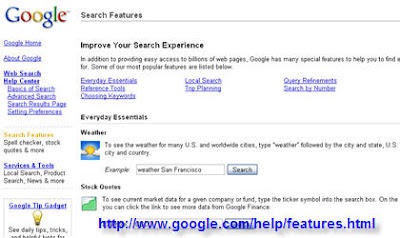
Improve Your Searches Using Google Features

You type in the Google search box and hope for the best. Tsk, tsk. There is so much more you can do to refine your search results and save yourself a bit of time. So let's take a quick look at library specific feature that will help you get the most from your Google experience.

Google Feature PageSearch Box Quickies

These are some of the things you can do to get your answer quickly without having to find a specific web site. There are many tools that can help you survive the Ready Reference desk whammo of the day. This is just a sample:
  • To get a definition of a word type define, press the space bar and then your word.
  • Use it as a calculator, if you know basic math just type in the formula and press search. Your answer will appear before your eyes.
  • To find a restaurant in a certain zip code type the kind of food, press the space bar and then the zip code. Google will show you a list of the area restaurants with a map, the name of the restaurant and their web site. You might think it is important but I have people asking me all the time where can I go for a taste of Yak.
So if you are very busy spend a little time on the Google web search page and learn a few quick tips that will help you find what you need more efficiently.

Those of you who will be sitting at the Ready Reference desk will absolutely want to embed these skills to memory.

Sunday, 5 October 2008

Adam Matthews Digital Subscription Resources

Adam Matthew Digital is a subscription database that handles specialized collections. The target audience would be those folks interested in research, education and librarianship.


The collections are divided into 20 areas of focus that include:
  • America, Asia and the Pacific
  • India, Raj and Empire
  • Defining Gender, 1450 - 1910
  • Travel Writing, Spectacle and World History
  • China, Trade, Politics and Culture 1893-1980
What is available is primary sources from diarists/journalists (in this case people who had direct experience with a situation and wrote letters to friends or recorded the event for their personal memory book) and documentation from business sources, drawings and photographs and similar material.

The collection draws upon the experience of teachers, professors and library collections. There are essays available to provide an introduction. This is a fee based service but there are free samples that you can use to evaluate the usefulness of the collections.

I was able to find an sample article on "Research Strategies on Women, Popular Culture and Family Life in American 1800-1920" by Amy Blair, Assistant Professor, Marquette University.
It was a review of the publication of that time that reflected the cultural values of what a woman should aspire in terms of her home, domestic affairs and fashion.

If you are interested in evaluation the site there is a four week trial period that is available to librarians or school faculty. There is none available to students. However I would suggest that students keep an eye out for some of the free sample information that is located on the site. A few of the freebies that I found was very informative.

Sunday, 7 September 2008

The Carlyle Letters - Victorian Reference Sources

There is something to be said about obtaining history from primary sources. If you are interested in the Victorian era, life during the time of the potato famine or how people communicated without cell phones, Internet or even telegraph then you should visit The Carlyle Letters Online from Duke University Press.

Duke University Press Carlyle Letters Online
You will have the opportunity to meet Thomas and Jane Carlyle and be introduced to some of their family, friends and life in the 19th century. There are over 10,000 letters written to and from the leading lights of the day such as Elizabeth Barrett Browning and Robert Browning, Charles Dickens, George Eliot, Ralph Waldo Emerson and many more.

You will also get a sense of gender relations, travel, the importance of the Victorian class system and an overview of the society at that time.

Insight on the Potato Famine

One of the letters I read talked about the Irish population and the Potato Famine. The disease that infected potato cultivation did not just affect the Irish community. Most of the United Kingdom was impacted. As the potato crop died other crops became more valuable and fortunes were lost and made because of the famine.

I learned that there was a proposal to provide job infrastructure projects to help the Irish population sustain itself. The project was discourage and defeated by the merchants and landlords. The business class felt that such assistance would be a violation of free trade. It gives me an opportunity to compare that sentiment with discussions we in the 21st century are having about health care and governmental involvement.

Easy To Navigate and Find Information

It is easy to find letters on a certain topic. You can search by date, by the recipient of the letter or by subject. For example, when I selected London Library, I was provided a list of letters that talked of Thomas Carlyle's concern about who should be the next Librarian.

The letters are all connected via links so that you can follow the flow of the "conversations" or jump to a specific writer and follow his/her contributions. There are subject notes and footnotes to help explain changes in meaning or obscure words.

This is an excellent resource to add to your research and information gathering kit.